

Validations have a critical role in ensuring SalesForce system integrity and accuracy of transactions. The selection, design and implementation of proper solutions is not possible without understanding the system and its specification.
The critical role of application controls in ensuring system integrity, particularly within Salesforce’s validation rules. It outlines the configuration process, emphasizing the need for accurate rule setup and error condition definition.
Application controls play a vital role in system integrity, ensuring seamless integration and accuracy of transactions and data specific to the application.
In Salesforce, Validation on objects are configured in Object manager, in Validation rules after selecting an object to validate. Validations prevent the system from doing some activities. This is set by expressions or formulas in the Error Condition Formula, outputting „true” if improper values are entered.
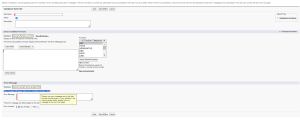
To properly configure a validation, rule name and description should be populated and rule should be activated. After that, the Error Condition should be created and “Insert field”, “Insert Operator” and “Insert Selected Function” buttons might be helpful before suggesting the system logic that should be followed. “Check syntax” supports checking bugs in formulas.
The last step is to provide an “Error Message” that should be displayed if the Error Condition Formula is True. Additionally, it might be selected if the message should be displayed Top of the Page or next to the field with error.
Application controls are closely tied to technology and proper gaps identification is crucial for comprehensive risk management.
Business case
Let’s assume that a hypothetical organization wants to have all assets with a serial number that starts with 4. In such a case a validation rule with a formula “BEGINS” might be created as a solution.
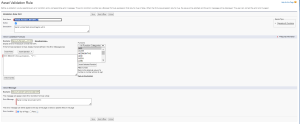
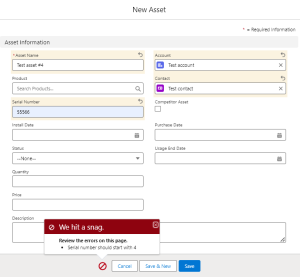
Testing this rule confirms that asset with serial number that doesn’t start with 4 cannot be created in the system. Error message is displayed when user tries to create new asset with serial number begins with 5
However, it’s essential to note that validation rules with the BEGINS function may consider blank fields as valid (For example, a validation rule that tests whether the serial number begins with 4, all assets with a blank serial number are considered valid). To address this, create additional validation rules or modify the Error Condition Formula.
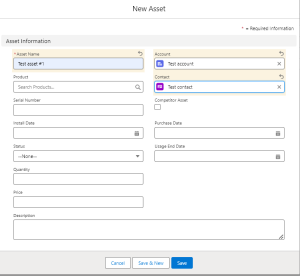

The presented validation rule example underscores that application controls are inherent to the system and depend on its architecture. A proper understanding of the system is essential for the effective design and assessment of controls.